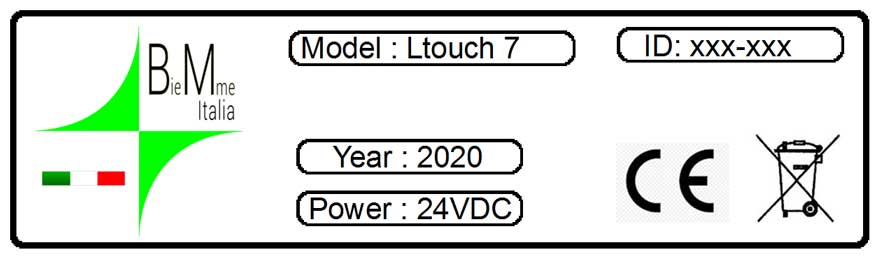
On the back of the product there is a label with the model, the year of construction and ID: identification number of the Ltouch
Download the user manual
When you purchase any of our products inside the package you will find a sheet with the credentials to access our customer area. Frame this QRCODE in the sheet so as to speed up all the steps. Use the credentials that we have provided you. You will find a user manual, libraries, tutorials, examples.
in our channel, you will find videos that can help you to make the best use of Ltouch
isn't this help enough? Do you have a question ?
we will not leave you alone, but we will always be by your side, at no additional cost
store@biemmeitalia.net
here you find a person who answers all administrative questions
info@biemmeitalia.net
here you find a person who answers all the technical questions
Ltouch Service and Repair
BieMme Store Customers:
If you bought a product through this on line store, please login into your account, select the order for which you need a return/repair. At the bottom of the page, find the RMA section, fill out the web form briefly describing the reason for return and the condition of the item. By submitting the form, a RMA will be created for you. In case you forgot your account’s password, please use this method to recover it.
Off line Customers:
Conversely, if you bought products through one of our sales manager, just download this document, fill it out and return it to us by email. The RMA department will email you back an RMA number or provide an explanation for denying the request. Please make sure to read the policies for return and replacement products.